
Blog
How to split a restaurant bill with AI (no group needed)
The dinner was great until the bill arrived. One person paid with their card, someone had the steak, two people shared the appetizer, and only half the table drank wine. Splitting that "equally" is not fair — and doing it by hand in a notes app is exactly how the awkward part starts.
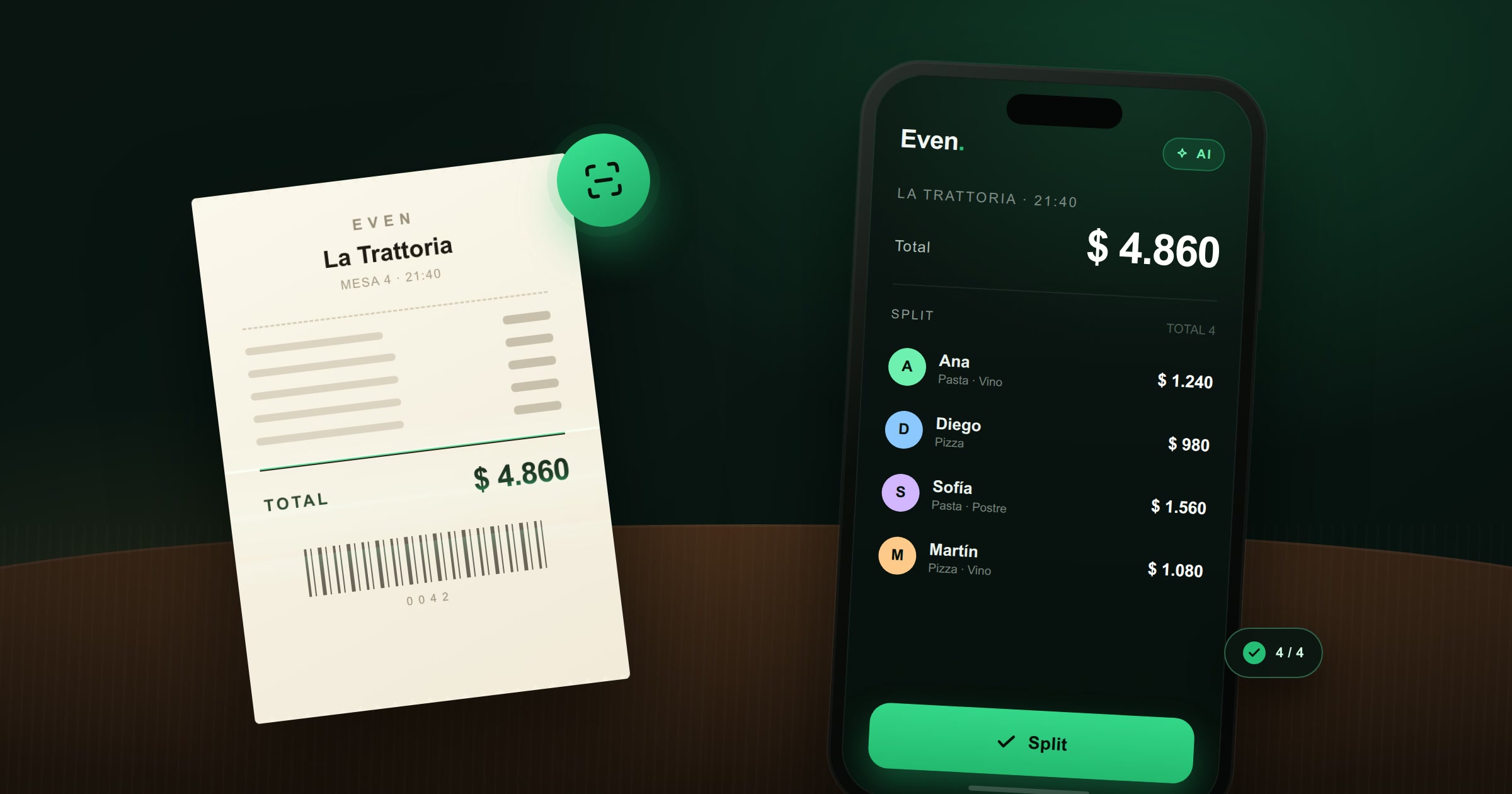
Even now has a faster way: take a photo of the receipt and let AI do the reading. It detects the products, you assign each one to whoever consumed it, and the app tells you what each person owes. You can do it in seconds, even if you don't have a group, and then share the breakdown with everyone at the table.
Why splitting "by headcount" never works
Dividing the total by the number of people is quick, but it is rarely fair. The person who ordered the cheapest dish ends up subsidizing the one who ordered the most expensive steak and the bottle of wine. The usual alternatives are not much better:
- Doing the math in your head: someone always rounds in their favor, usually without meaning to.
- A notes app: it works until the bill has 15 items, a discount, a service charge and someone who arrived late.
- Asking the waiter to split it: some places do it, many don't, and it holds up the table.
The fair split needs two things: the real total, and who consumed each item. That is exactly what the receipt already contains — the hard part is reading it and doing the arithmetic.
How AI receipt scanning works in Even
The feature is called Smart Scan (Smart Receipt Scanning) and it is part of Even Pro. The flow is short:
- Open Even and tap Scan Ticket.
- Choose Scan without saving if you only want to split this one bill.
- Enter the first names of the people at the table — names only, no phone numbers or accounts.
- Take a photo of the receipt or upload one from your gallery.
- The AI detects the merchant, the total and the individual products.
- Assign each item to whoever consumed it. If a dish was shared, select everyone who ate it.
- Tap Confirm Smart Split and check the How much each one pays summary.
You can review and correct the merchant, the total, the currency and each amount before confirming. If the photo is not clear enough, you can rescan it. And if the AI cannot detect individual products, it still reads the total and splits it among the participants you selected.
Splitting a dinner without creating a group
This is the part that makes the feature useful beyond regular groups. You don't need to create a group, send invitations or ask your friends to install anything. The Scan without saving mode works as a one-off calculator: you add the names, scan the receipt, assign the items and see the result.
No group is created and no expense is saved. It is ideal for a dinner with coworkers, a birthday lunch, a one-time outing or any table where you will probably never share expenses again.
What if everyone ordered differently?
This is where item-by-item assignment wins. Some examples:
- The steak goes only to the person who ordered it.
- The appetizer is assigned to the three people who shared it, so its cost is divided by three.
- The bottle of wine is assigned only to those who drank it.
- The birthday cake is assigned to everyone, because everyone had a slice.
You can also apply a global discount to the receipt, and the app recalculates each person's share proportionally. The result is not an approximation: it is the actual sum of what each person consumed.
Sharing the breakdown with the table
Once the split is ready, you have two ways to send it:
- Text: copy a summary with the place, the date, what each person owes and the total. Paste it into the group chat or send it individually.
- Image: generate a clean card with the Even logo and the split, and share it through WhatsApp or any other app.
When you share the image you can choose whether to include the item detail — who ate what — or only the totals per person. That is useful when someone just wants the final number, or when you prefer not to publish the whole order.
Your friends don't need Even to see the result. They receive the summary and pay what corresponds. If the dinner becomes a recurring thing, you can create a group later and keep using the same flow with saved expenses.
Scan without saving vs. scanning into a group
Even offers both paths from the same Scan Ticket button:
- Scan without saving: for a one-off bill. Nothing is stored as a group or an expense.
- Scan to a group: for trips, roommates or recurring dinners. The receipt is saved to the group and each participant sees their share in the app.
If you are unsure, start without saving. You can always create the group afterwards if the bill turns out to be the first of many.
Quick answers
Can I split a restaurant bill without creating a group?
Yes. Use Scan without saving, add the names and scan the receipt. You get each person's share without creating a group or saving an expense.
How accurate is the AI reading?
It detects the merchant, total and products from a clear photo. You can review and correct any value before confirming, so the final split is always under your control.
Do my friends need the app?
No. Share the summary as text or as an image; they only need to read it and pay their share.
Stop doing dinner math. Scan the receipt with Even, assign each dish and share the breakdown in seconds. Smart Scan is included in Even Pro.
Get Even